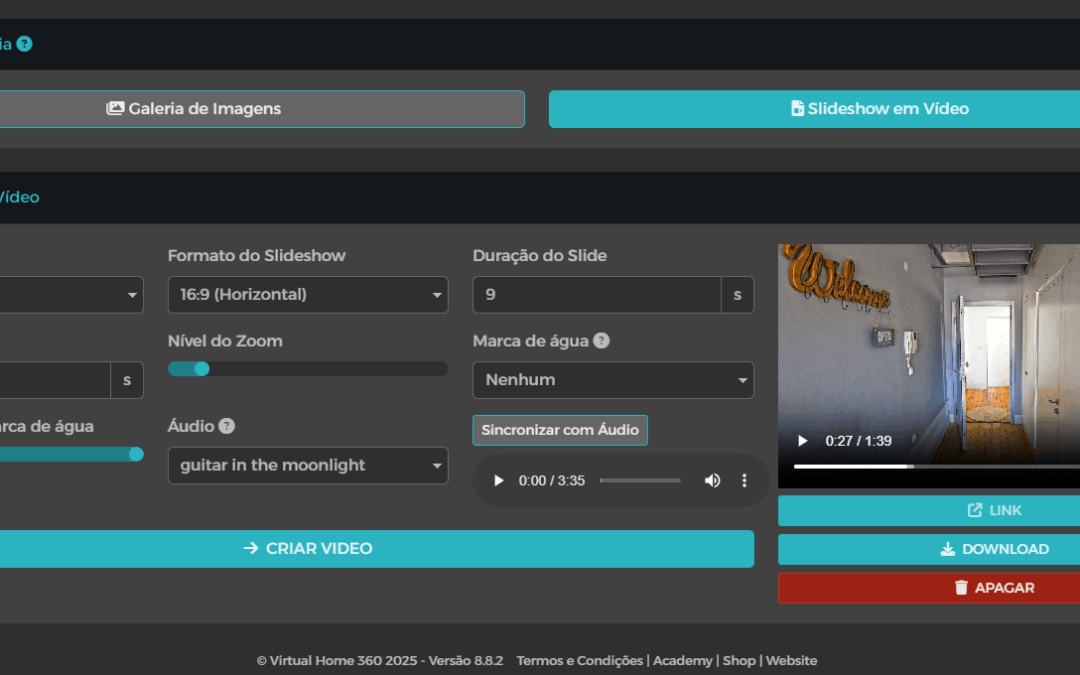
On Gallery > Video slideshow it is possible to create a video with the photos present in the gallery.
The customization options are as follows:
- Slide duration – the time the slide is present;
- Transition duration – the transition time between slides;
- Zoom quantity – the amount of zoom applied in the transition;
- Watermark – the Tour logo will appear in the selected position;
- Audio – the music that accompanies the slideshow of those present in the library of Audio.
To change the order of the photos in the video you must change the order of the photos in the top list.
Once the settings have been selected, click the button Generate Video. The time of creation of the video is approximately 3 times the time of its duration (a video with 1 minute of duration, should take about 3 minutes to generate). While you wait, you can open a new window and continue working on your tour(s).
If you leave the tab selected Video slideshow, the generated video will be used in the tour instead of the traditional photo gallery (if the gallery function is active in the Configurator). To use the gallery on the tour, you must select the tab Photo slider.
Once generated, the video is available for download and sharing on the various platforms.